










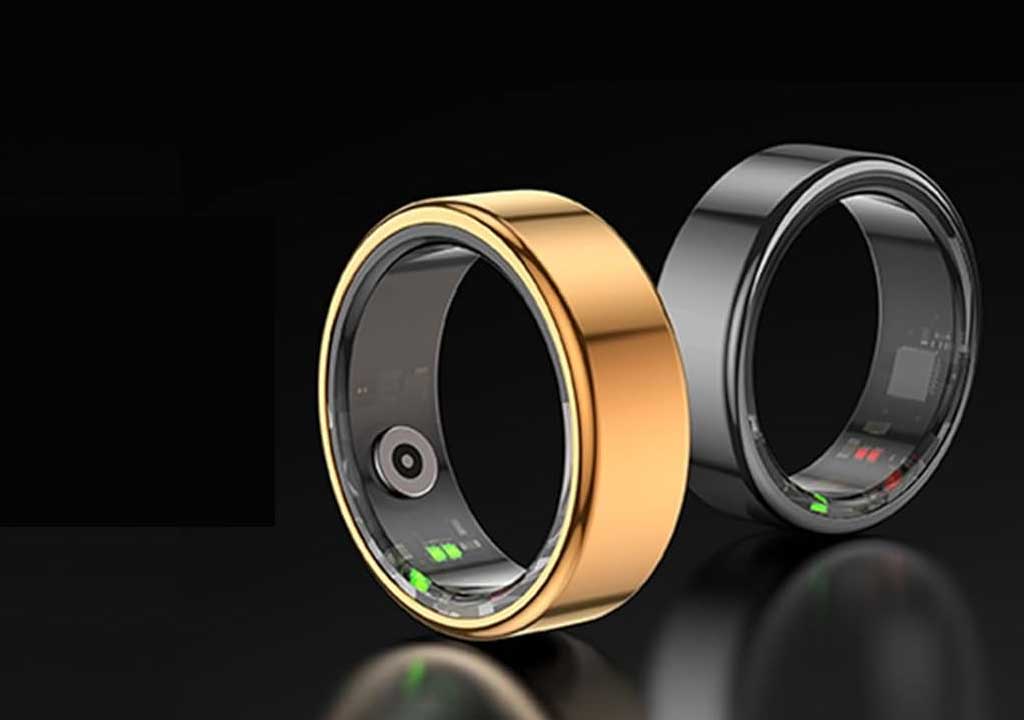
Tiny Gestures, Big Impact: Interaction Design for Smart Ring Style

Tiny Gestures, Big Impact: Interaction Design for Smart Ring Style
In the pantheon of wearable technology, the smart ring sits at an unusual and compelling intersection. It is small enough to disappear on a finger, yet powerful enough to orchestrate a user’s digital life with a flick, a twist, or a tap. The secret sauce lies not in the sophistication of the hardware, but in the elegance of the interactions—the tiny gestures that carry outsized meaning. This blog post explores how to design interaction systems for smart rings that leverage micro-gestures to deliver meaningful, reliable, and delightful user experiences. We’ll cover principles, gesture libraries, feedback mechanisms, accessibility, privacy, and practical guidelines for teams building or evaluating smart ring experiences.
1. Understanding the Smart Ring Form Factor
A smart ring is a device you wear around your finger, typically optimized for quick, contextually rich inputs. The form factor imposes unique constraints and opportunities. Constraints include limited surface area for input, proximity to the hand and body (which affects sensing accuracy), the need for power efficiency, and the necessity of unobtrusive, ambient feedback. Opportunities arise from natural hand interactions that people perform anyway—adjusting a ring, turning a wheel with the finger, or making a quick gesture while the hand is in motion. The ring’s intimate contact with the body can sometimes enable very sensitive sensing—motion, grip strength, micro-tulses of pressure, and subtle rotations—without demanding a large cognitive load from the user.
Designers must embrace the idea that the ring does not replace a phone or watch, but rather augments the user’s ecological workflow. The ring can act as a discreet control surface for notifications, media, smart home devices, and quick actions in augmented or real-world contexts. Because the ring operates within a wearer’s natural field of activity, the best interactions are those that feel effortless, reversible, and predictable—without requiring deliberate, attention-consuming setup each time.
2. Core Design Principles for Tiny Gestures
Micro-gestures, by their nature, carry risk: they can be easy to perform accidentally, hard to discover, or difficult to remember across contexts. To counter these risks, successful smart ring design rests on a few core principles:
Clarity and Predictability. Every gesture should map to a small, canonical set of actions. Avoid a sprawling gesture grammar that users must memorize or that requires constant lookup. Favor consistency across devices and ecosystems so users do not need to relearn gestures when they switch apps or platforms.
Feedback Timeliness and Fidelity. Users should receive immediate, legible feedback after a gesture. Haptic feedback, subtle audio cues, and visual indicators (when contextually appropriate) should confirm that the action has been recognized and acted upon. Latency should be minimized to preserve the sense that the gesture is an extension of intention, not a distraction.
Error Handling and Reversibility. Design for accidental gestures by including undo, confirmation for irreversible actions, and a reversible action path. If a user misfires, a quick, obvious correction path preserves trust and encourages continued use.
Contextual Relevance. The same gesture should perform different actions depending on context only when those actions are predictable and useful. For example, a single tap might play/pause music at home, but skip a track in transit if the user is commuting. Context awareness should be transparent and user-controllable.
Efficiency and Habit Formation. Tiny gestures should be lighter than evaluating a smartphone screen. They should fit naturally into daily routines and become almost invisible through practice, reducing screen time without sacrificing functionality.
Accessibility and Inclusivity. Provide alternative pathways, adjustable gesture sensitivity, and options for left- or right-handed users. Some users may wear gloves, have tremors, or rely on assistive technologies; design should accommodate these differences wherever possible.
3. Interaction Patterns: What Gestures Could a Smart Ring Support?
When we talk about a smart ring, we’re often describing a compact catalog of gestures that leverage the finger’s natural range of motion. Here are common interaction patterns to consider, along with practical mappings that align with real-world use cases. Note that this is a library of patterns you can adapt, rather than a universal requirement.
Tap and Double-Tap. A quick touch on the ring or a press of the sensor can trigger primary actions. A single tap might play or pause media, answer a call, or acknowledge a notification. A double-tap can toggle modes, skip to the next track, or switch devices in a multi-device ecosystem. Keep these gestures distinct in timing and sensation to avoid accidental matches.
Rotate or Twist (Circumferential Gesture). The ring can sense rotation or yaw around its axis. A clockwise twist could increase volume, while a counterclockwise twist could decrease it. Rotational input is particularly engaging for media control and volume adjustments because it leverages a tactile, one-handed action without requiring screen interaction.
Hold or Press (Sustained Contact). Pressing the ring for a longer duration can trigger mode changes, voice activation, or access to a shortcut palette. The duration threshold should be adjustable to accommodate user preference and environmental constraints.
Swipe or Glide (Edge-Based Gestures). A light swipe around the ring’s perimeter can navigate menus, browse photos, or switch app contexts. Because the ring’s form is circular, a swiping motion can be intuitive for cyclic navigation or quick scrolling through lists.
Squeeze or Pinch (Grip-Based Signals). Some designs may sense changes in finger pressure or grip tightness. A gentle squeeze could silence a notification, while a firmer squeeze could trigger a “do not disturb” mode or a quick action in a connected ecosystem.
Tap-and-Hold Plus Movement (Composite Gestures). Combine a hold with a subsequent movement to unlock more powerful controls. For example, hold to enter a control mode, then rotate to adjust a parameter. Composite gestures can unlock advanced interactions without requiring additional surface area.
In practice, your design should begin with a small, well-defined gesture set and gradually expand through user testing and feedback. It’s often better to have a compact, highly reliable set of gestures than a long, inconsistent catalog.
4. Feedback Systems: Haptics, Audio, and Visual Cues
Feedback is the bridge between intention and action. In a smart ring, feedback must be unobtrusive, reliable, and fast. The human sense system appreciates redundancy but not disruption. Here are effective feedback strategies:
Haptics as Primary Feedback. Vibration patterns can convey successful recognition, errors, or mode transitions. Use a small, distinct pattern for each category of action (e.g., a short buzz for success, a double buzz for warning, a longer buzz for critical actions). Avoid overly long or loud patterns that could disturb people in quiet environments.
Auditory Cues When Appropriate. In phone or headphone-connected contexts, soft audio cues can reinforce gestures. However, do not rely exclusively on audio, since many situations require silent feedback (libraries, meetings, workouts). Provide user controls to mute or reduce audio cues.
Visual Signals When Context Allows. If the ring is interacting with a display on a nearby device (phone, watch, or smart glass), consider brief, non-intrusive visual indicators. For example, a quick LED ring glow or a subtle on-screen cue can reassure the user that a gesture was recognized.
Latency and Confidence Indication. If the system cannot immediately perform an action due to connectivity or processing delays, communicate that state clearly. A small, non-intrusive indicator (e.g., a progress ring or subtle vibration) can prevent user confusion and repeated gestures.
5. Context, Privacy, and Security: Designing responsibly for tiny gestures
With great power comes responsibility. Smart rings operate in potentially sensitive contexts (notifications, calls, health data, smart home controls). Designers should embed privacy-by-design and security-by-default into every gesture and workflow.
Consent and Transparency. Make it clear to users what a gesture can do and what data it might trigger. Provide easy-to-access privacy settings that allow turning off gesture-based controls for specific apps or environments.
Intentional Activation. Favor deliberate activation patterns, such as a hold-before-action sequence for critical operations. This reduces accidental triggers, especially in public or dynamic environments where movements abound.
Context-Aware Privacy. Consider environmental factors when deciding which gestures are available. For instance, in a shared space, limit sensitive actions like unlocking devices or accessing sensitive information unless a strong, user-initiated gesture is performed.
Security Considerations. Avoid using high-sensitivity gestures for authentication unless accompanied by strong, multi-factor authentication or device-bound security policies. If used, ensure there’s a reliable fallback and a clear lockout mechanism after repeated failed attempts.
Data Minimization and Local Processing. Process as much as possible on-device to reduce data exposure. Share only the minimum necessary information with connected services, and provide clear controls for data retention and deletion tied to gestures.
6. Accessibility and Inclusive Design for Tiny Gestures
Accessibility must be a first-class concern when designing micro-interactions for a ring. Some users may rely on different modalities or have motor challenges that affect gesture capability. Here are practical approaches:
Customizable Sensitivity. Allow users to adjust gesture detection thresholds. What feels effortless for one person might be challenging for another. A range of sensitivity settings helps accommodate tremors, arthritis, or different finger sizes.
Alternative Control Pathways. Provide non-gestural alternatives, such as voice commands, or contextual shortcuts via a companion app. This ensures people who cannot reliably perform ring gestures still have access to essential functions.
Left/Right-Hand Configuration. Ensure gestures and feedback adapt to the wearer’s dominant hand and ring orientation. Ring geometry can differ on the left vs. right hand due to anatomy and habit, so offer orientation-aware presets and intuitive remapping.
Glove Compatibility. Consider how gesture sensing depends on skin contact and surface exposure. If users wear gloves, ensure the ring can still register at least a subset of core gestures or provide a glove-mode that expands input recognition without sacrificing accuracy.
7. Prototyping and Testing: From concept to reliable interaction
Prototyping smart ring interactions involves a blend of hardware sensing, software signal processing, and human-centered testing. Here are practical steps to iterate effectively:
Early Gesture Sketching. Start with a small gesture set and map them to a few high-value actions. Use low-fidelity prototypes (e.g., finger-mounted sensors or mock devices) to gather qualitative feedback on intuitiveness and comfort.
Simulated Environments. Test gestures in real-world contexts—commuting, walking, waiting in line, exercising. Observing users perform gestures in diverse settings helps reveal edge cases such as ambient movement interference or unintended activations.
Quantitative Metrics. Track detection accuracy, false positives/negatives, average time-to-action, and user-reported ease of learning. Establish acceptable thresholds for activation latency and gesture error rates before expanding the gesture set.
Iterative Refinement of Sensitivity. Use A/B tests to compare different sensitivity configurations and feedback patterns. The goal is to find a robust sweet spot that minimizes accidental triggers while preserving quick accessibility.
In-the-Wild Studies. Deploy limited real-world pilots for extended periods to observe how people integrate ring gestures into daily routines. Collect qualitative insights through interviews and diaries to inform design changes beyond control-oriented metrics.
8. Design Systems and Interaction Taxonomies for Smart Rings
A coherent design system helps teams scale smart ring experiences across apps and devices. Consider the following components:
Gesture Taxonomy. Define a formal language of gestures with names, sensory signatures (tactile, rotational, pressure-based, etc.), typical accuracy ranges, and associated actions. This taxonomy should be stable but extensible as new hardware capabilities mature.
Feedback Palette. Standardize haptic patterns, audio cues, and visual indicators tied to specific actions or states. A consistent palette reduces cognitive load and increases predictability.
Privacy and Safety Rules. Codify settings for consent, data sharing, and context-aware restrictions. Tie these rules to gestures to ensure predictable behavior in sensitive contexts.
Accessibility Defaults. Include default configurations that optimize comfort and legibility for users with diverse abilities, with simple paths to customizations.
9. Case Studies and Practical Scenarios
To ground these concepts, consider some practical scenarios where tiny ring gestures deliver meaningful outcomes:
Music and Media Control. A clockwise twist to raise volume, counterclockwise to lower, a tap to play/pause, and a double-tap to skip tracks. In transit, a hold-to-activate a voice assistant can minimize screen interaction. The ring’s immediacy makes it ideal for controlling media without pulling out a phone.
Notifications and Quick Actions. A gentle tap could read the latest notification aloud via paired audio devices or summarize it discreetly on the connected screen. A hold-and-rotate gesture might mute notifications for a set period or set a “focus mode.”
Smart Home Orchestration. A ring gesture could dim lights by rotating the ring and nudging a light scene into view, or activate a preconfigured routine with a hold followed by a rotation. In emergency scenarios, a long hold could trigger a rapid alert to trusted contacts.
Fitness and Wellness. Swipes around the ring could switch workout modes or scroll through session metrics, while a tap could log an activity. Subtle haptics can alert the user to target heart rate zones or time intervals during a routine.
Productivity and Context Switching. In a professional setting, a quick set of gestures might switch between documents, take quick notes with a voice-to-text assistant, or release a calendar event without interrupting the user’s current task on a computer or tablet.
10. Common Pitfalls and How to Avoid Them
As with any new interaction paradigm, there are risks. Here are common pitfalls and practical strategies to mitigate them:
Overloading the Gesture Catalog. Start small and prove reliability before adding more gestures. A bloated, fragile gesture set is a recipe for frustration and misfires.
Ambiguity with Context. If gestures have context-dependent meanings, provide clear, discoverable cues and straightforward ways to discover or customize context behavior.
Insufficient Feedback. Failing to confirm recognition or outcomes erodes trust. Ensure at least one obvious feedback mechanism for every gesture and action.
Inadequate Battery Management. Ring-based sensing can be power-intensive. Optimize sensor sampling rates, employ wake-up strategies based on motion, and offer user-adjustable power profiles.
Accessibility Gaps. Ensure there are non-gesture options or adjustable gestures so that users with different abilities can participate fully in the ecosystem.
11. Practical Guidelines for Teams
If you’re building smart ring experiences, here are concrete guidelines to keep teams aligned:
Start with User Goals, Not Gestures. Identify high-value tasks users want to accomplish hands-free. Build a minimal viable gesture set that accomplishes those goals reliably.
Prototype in Real Contexts. Test gestures in the wild, not only in controlled labs. Real-world usage reveals subtle issues related to movement, environment, and device orientation.
Guard Against Accidental Activations. Design for deliberate initiation, perhaps with a hold or combination gesture, especially for critical actions.
Offer Personalization. Provide easy-to-use tools that let users tailor gesture mappings, sensitivity, and feedback preferences. Personalization increases adoption and satisfaction.
Document and Communicate Deliberately. Maintain a clear design doc for the gesture language, feedback standards, privacy rules, and accessibility choices. This helps cross-functional teams stay aligned as the product evolves.
12. The Path Forward: Where Tiny Gestures and Big Impact Converge
The future of smart rings lies at the convergence of sensory sophistication, intelligent context-awareness, and humane interaction design. Advances in fabricating flexible, breathable rings with ultra-low-power sensors, combined with on-device edge AI, can yield richer gesture recognition without sacrificing comfort or privacy. We may see multisensor fusion enabling more expressive micro-gestures, such as combining subtle finger pressure with precise rotational data to unlock new control layers. As ecosystems mature, ring gestures could become a standard, intuitive way to manage not only phones and wearables but also a broad spectrum of connected devices—cars, appliances, health systems, and workplace tools.
Crucially, the most impactful designs will be those that respect the user’s autonomy, protect privacy, and deliver consistent, predictable outcomes. Tiny gestures should empower users to stay in rhythm with their daily lives—reducing friction, enhancing focus, and enabling meaningful interactions without demanding attention or exposing them to risk. When done well, a ring’s minute motions become a trusted language of interaction, a subtle choreography that makes technology feel almost invisible, yet profoundly capable.
Conclusion: Embracing the Subtle Power of Interaction
Tiny gestures, when thoughtfully designed, unlock big, tangible benefits. A smart ring is more than a gadget; it is a portable, intimate interface that lives at the edge of our everyday actions. By embracing clear gesture sets, robust feedback, principled privacy, inclusive accessibility, and rigorous prototyping, teams can create ring-based experiences that feel natural, empowering, and enjoyable. The goal is not to overwhelm users with a high-tech wizardry of inputs, but to elevate their ability to control their digital world with minimal effort and maximum confidence. In the end, the best designs make the invisible work feel effortless—tiny gestures with enormous impact.
If you’re exploring smart ring interactions, start with a focused gesture set, design for legibility and repeatability, and test in real-life contexts. Invite user feedback early, iterate with empathy, and always prioritize safety and privacy as core design constraints. The ring may be small, but its design impact can be huge.
LIKED THIS ARTICLE? SHARE IT: